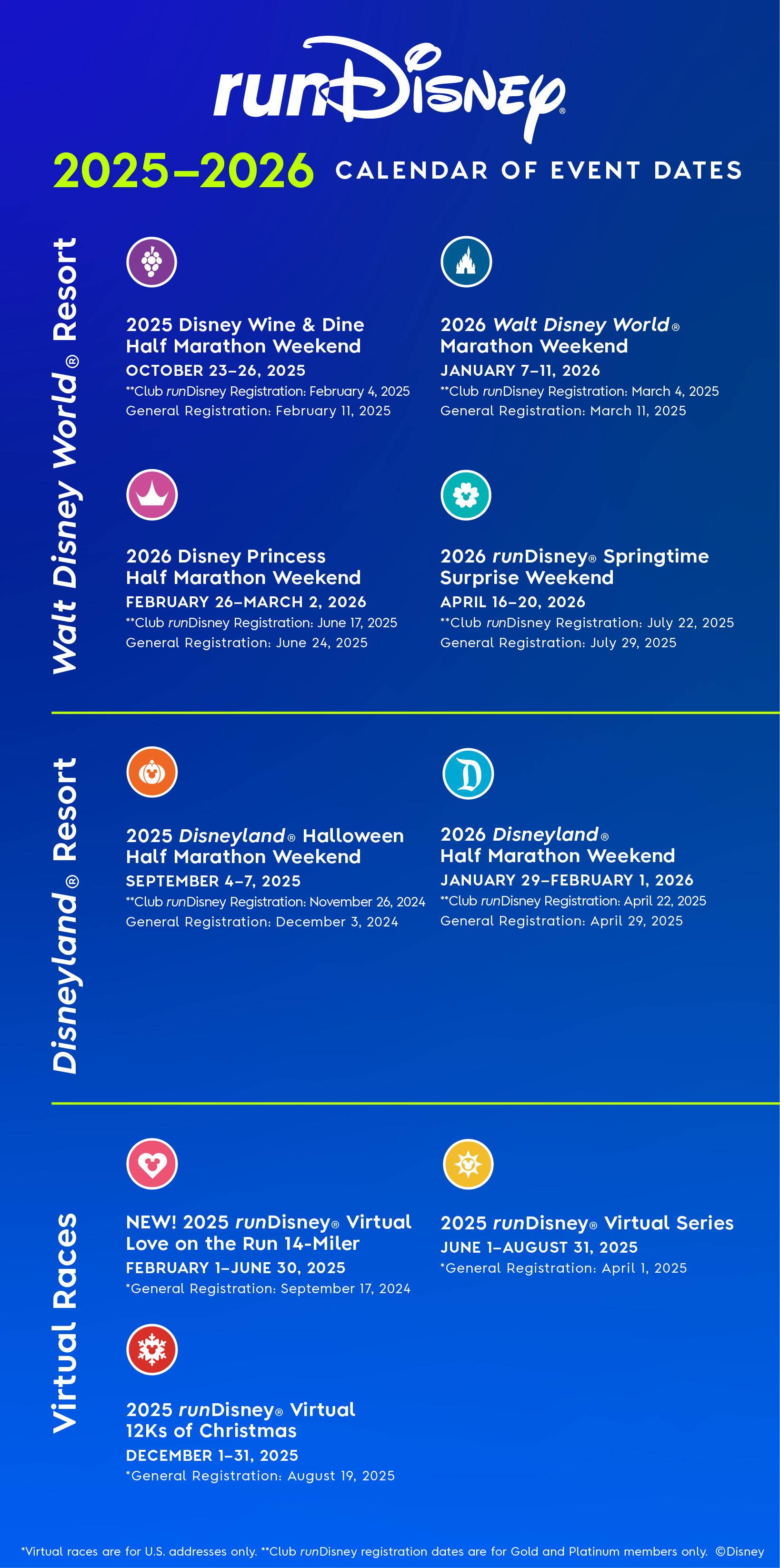
Where can I find a list of upcoming runDisney races?
Click here to view our 2026-2027 race season calendar.
What health and safety guidelines will be required during the races?
We will continue to provide the latest updates leading up to our race weekends. For the latest updates, please refer to the Race Weekend Policies for each race weekend and the Walt Disney World Resort Know Before You Go page for the latest health and safety measures, policies and operational guidelines.
Do I need to purchase a theme park ticket to participate in the race?
No. A theme park ticket is not needed to participate in a runDisney race.
Is there a pacing requirement for my race?
Yes. Each weekend event race has pacing requirements. You can find details on the specific race page under pacing requirements.
What happens if I can't keep up with the pacing requirement?
Anyone not able to maintain the pace may be picked up and transported to the Family Reunion Area at any point along the course.
Is this race walker-friendly?
Yes, walkers are welcome in a runDisney event. Just be sure to maintain the minimum-pacing requirement for the race you’re participating in when walking. If you fall short, no worries! Our shuttle will be along to pick you up at a safe location along the course.
Is bag check available for runDisney races?
Yes. For more information, you can find specific details on the Runner Info page for your race weekend.
What is on my personalized bib?
Your personalized bib will display your first name and your race number, which is valid for the runDisney races you are registered for during that particular weekend. Your start group placement can be found on your bib as well.
What do I need to bring with me to pick up my bib?
Download and complete your race waiver (available approximately 2 weeks prior to the event). You must have a valid ID in order to pick up your race bib (driver's license, passport, military ID or government-issued ID), and you may not pick up another adult participant's race bib. Parents or legal guardians must complete the race waiver for minors in order to pick up their race bibs.
Am I allowed to wear a costume in runDisney races?
Yes; however, costumes cannot interfere with the safety of you or other runners. If a costume is questionable or offensive to others, Disney reserves the right to either have you change into something more appropriate or remove you from the event. Please refer to your specific event under Race Policies to review The Walt Disney Costume Guidelines.
Can I use headphones while racing?
Headphones can be worn but are discouraged due to audio messages played throughout the course to ensure the safety of all runners.
Are there any other restrictions I should know about?
Yes, additional restrictions may apply on an event-by-event basis. Please review the race policies for each specific weekend event. You can also refer to our runDisney Digital Event Guide.
Will the race be cancelled or postponed due to weather?
All runDisney races will be held rain or shine, except in the case of lightning or other circumstances if the runDisney Event Management staff determines in its sole discretion that cancellation or postponement is necessary.
How can I link my runDisney photos to PhotoPass?
All photos taken by photographers during runDisney events will be linked to your bib number—no need to stop to collect PhotoPass Cards or link to MagicBands. Photo linking instructions will be included in race event guides and on the runDisney results page.
View and buy your runDisney photos at MyDisneyPhotoPass.com or on the My Disney Experience app available within 48 hours after your racing event. Better yet, be a proactive racer and order Memory Maker. You'll get unlimited digital downloads of all your Disney PhotoPass photos and videos from your runDisney event—for just one price!
View and buy your runDisney photos at MyDisneyPhotoPass.com or on the My Disney Experience app available within 48 hours after your racing event. Better yet, be a proactive racer and order Memory Maker. You'll get unlimited digital downloads of all your Disney PhotoPass photos and videos from your runDisney event—for just one price!
Can runDisney races serve as qualifiers for other races?
Yes, some of our races do qualify. All of our timed races are on USATF certified courses and the Walt Disney World Marathon can be used as a qualifier for races such as the Boston Marathon.
If I do not stay at Walt Disney World Resort, is there a shuttle that will pick me up for my runDisney event?
Disney transportation is only available for Guests staying in a hotel at Walt Disney World Resort, Shades of Green® or Walt Disney World Swan and Dolphin Resort. Check with your hotel for shuttle service to the event or consider a private car service option.
Are there childcare options at the race site?
No. If your kids are going to accompany you to the event and wait while you run, you’ll need to provide your own supervision. Please note: Children under the age of 14 may not be left unaccompanied by an adult on Walt Disney World Resort property.
How do I purchase products through runDisney.com after I am registered?
From the runDisney.com menu, select “Manage Account” and login using your MyDisney account username and password. When inside your account, you can select Purchase Products. From here, you can see the available products for purchase. Also, you will see any products you have previously purchased under Your Products. If you have registered multiple people, you can indicate who the product is meant for. Add the desired items to your gift bag and click Checkout.
How do I submit my proof of time?
Each weekend has specific proof of time requirements and deadlines. You can find details on the specific race page under Proof of Time Guidelines. For any questions regarding proof of time, email: disneysports@trackshack.com.
How do I print my Finisher Certificate?
Finisher certificates can be printed out from the Results page. Just follow the instructions as provided and print your certificate. Remember: Finisher certificates are only available for one year after the event.
Where can I opt-in to receive event updates via text?
You can opt-in through the registration form as well as from your participant account. From your participant account, go to Your Registrations and select Edit Your Registration. Here, a dropdown will appear, allowing you to edit your personal information as well as to opt-in or opt-out of receiving event updates via text.